
- TI nspire
[TI-nspire] 행렬의 입력 & 계산 - 확장 라이브러리 Matrix Library
-

- 2024.10.21 - 14:56 2015.01.13 - 22:45 15921 12
1. 라이브러리 설명
행렬의 입력 및 계산을 도와주는 확장 라이브러리입니다.
Matrix pieces Arithmetic function & Cofactor Expansion Program TI-Nspire
By creeras
Ver 1.5 (2024-10-21)
---
Usage
Function_name(matrix1,matrix2,row_number,column_number)
: For overwrite(), add(), subtract(), multiply(), divide()
Dim(matrix1) have to be bigger than dim(matrix2), and have to put all matrix2 elements opon matrix1 elements to calculate it.
Function_name(matrix,row_number,column_number)
: For insert(), insertrow(), insertcol(), minor(), cofactor()
Function_name(matrix,r or c,index)
: For coex()
Function_name(matrix)
: For adjoint(), rank(), lunp()
Caution
Result of Function() is not stored to original matrix. So store it to original matrix variable or new matrix variable.
2. 함수 (및 프로그램) 설명
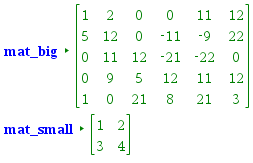
- add(matrix1,matrix2,row_number,column_number) : 행렬을 일부분만 더함
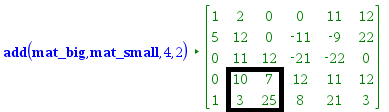
ㄴ mat_big 행렬에 mat_small을 더함. 4행 2열 ~ 5행 3열 부분만
subtract(matrix1,matrix2,row_number,column_number) : 행렬을 일부분만 뺌
multiply(matrix1,matrix2,row_number,column_number) : 행렬을 일부분만 곱함
divide(matrix1,matrix2,row_number,column_number) : 행렬을 일부분만 나눔 - overwrite(matrix1,matrix2,row_number,column_number) : 행렬을 일부분만 덮어쓰기 ; 기존 값은 무시되고, 새로운 함수의 값이 덧쓰입니다.
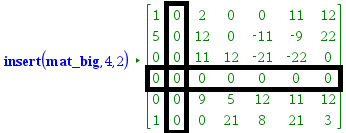
- insert(matrix,row_number,column_number) : 행 또는 열을 추가합니다. (0으로 채워져 있음)
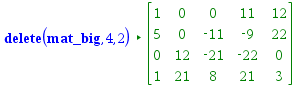
delete(matrix,row_number,column_number) : 행 또는 열을 삭제합니다(=소행렬)
- Insertrow(matrix,row_number,column_number) : 1행(만)의 이동.
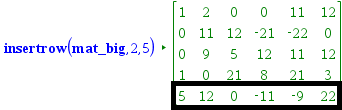
ㄴ 나머지 행들간의 순서변화 없음.
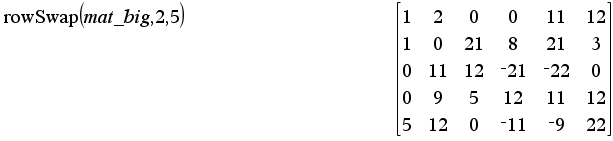
ㄴ 내장함수 rowSwap( )은 2행 사이의 위치 교환
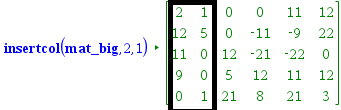
Insertcol(matrix,row_number,column_number) : 1열(만)의 이동. (나머지 열들간의 순서변화 없음.)
- minor(matrix,row_number,column_number) : "소행렬식", 부호를 고려하지 않은 소행렬의 행렬식. \( M_{ij} \)
cofactor(matrix,row_number,column_number) : 여인자, 부호를 고려한 소행렬식. \( C_{ij} = (-1)^{i+j} M_{ij} \)
adjoint() : 딸림행렬 = 수반행렬 - lunp() : permutation 없이 LU 분해하는 프로그램. // v1.4에서 추가됨. (다른 것들은 다 함수인데, 이것은 프로그램입니다)
https://allcalc.org/9593#comment_49292 - coex(matrix,r or c,index) : 여인자 전개 // v1.5 에서 수정됨.
3. 사용 방법
3-1. 라이브러리를 다운로드 : matrix.tns
3-2. TI-nspire의 MyLib 폴더에 옮겨 넣고
3-3. refresh Library : 【Doc】 【6】 상세 설명은 다음 링크 확인 https://allcalc.org/35636
사용하시면 됩니다.
4. 동영상 설명
5. 업데이트 내역
V1.31 (2015-11-22)
근사(approx)계산시 rank 오류 해결
V1.40 (2024-10-07)
lunp() 추가 // permutation 없이 LU 분해함.
V1.50 (2024-10-21)
coex() 수정 // 기존에 열선택할 수 없던 문제, 그리고 step-by-step 확인하지 못하던 문제 해결
-
25
댓글12
- 1
- 1
- 2
- 1
- 1
- 2
-
세상의모든계산기
여인자 전개 프로그램 수정 V1.5
Define LibPub coex(mat1,choice,index)=
Func
:© coex(matrix,r or c,index)
:© Initialize
:Local mat1_dim,i,j,co.result,minormat,sgn
:dim(mat1)→mat1_dim
:newMat(mat1_dim[1],2)→co.result
:
:©Main Body
:Disp "Cofactor Expansion ="
:
:If string(choice)="r" Then
:  If 1≤index≤mat1_dim[1] Then
:    For j,1,mat1_dim[2]
:[mat1[index,j],cofactor(mat1,index,j)]→co.result[j]
:      minormat:=delete(mat1,index,j)
:      sgn:=(−1)^(index+j)
:      If j=1 Then
:        If sgn=1 Then
:        Disp string(mat1[index,j])&"×det(",minormat,")"
:        Disp "(("&string(mat1[index,j])&")×("&string(minor(mat1,index,j))&"))"
:        Else
:          Disp "-("&string(mat1[index,j])&")×det(",minormat,")"
:          Disp "-"&"(("&string(mat1[index,j])&")×("&string(minor(mat1,index,j))&"))"
:        EndIf
:      Else
:        Disp "----------"
:        If sgn=1 Then
:          Disp "+("&string(mat1[index,j])&")×det(",minormat,")"
:          Disp "+"&"(("&string(mat1[index,j])&")×("&string(minor(mat1,index,j))&"))"
:        Else
:          Disp "-("&string(mat1[index,j])&")×det(",minormat,")"
:          Disp "-"&"(("&string(mat1[index,j])&")×("&string(minor(mat1,index,j))&"))"
:        EndIf
:      EndIf
:    EndFor
:  Else
:    Disp "Invalid Row Index"
:  EndIf
:
:ElseIf string(choice)="c" Then
:  If 1≤index≤mat1_dim[2] Then
:    For i,1,mat1_dim[1]
:[mat1[i,index],cofactor(mat1,i,index)]→co.result[i]
:      minormat:=delete(mat1,i,index)
:      sgn:=(−1)^(index+i)
:
:      If i=1 Then
:        If sgn=1 Then
:          Disp string(mat1[index,i])&"×det(",minormat,")"
:          Disp "(("&string(mat1[i,index])&")×("&string(minor(mat1,i,index))&"))"
:        Else
:          Disp "-("&string(mat1[index,i])&")×det(",minormat,")"
:          Disp "-"&"(("&string(mat1[index,i])&")×("&string(minor(mat1,index,i))&"))"
:        EndIf
:
:      Else
:        Disp "----------"
:        If sgn=1 Then
:          Disp "+("&string(mat1[index,i])&")×det(",minormat,")"
:          Disp "+"&"(("&string(mat1[index,i])&")×("&string(minor(mat1,index,i))&"))"
:        Else
:          Disp "-("&string(mat1[index,i])&")×det(",minormat,")"
:          Disp "-"&"(("&string(mat1[index,i])&")×("&string(minor(mat1,index,i))&"))"
:        EndIf
:
:      EndIf
:    EndFor
:  Else
:    Disp "Invalid Column Index"
:  EndIf
:Else
:  Disp "Invalid Choice : Input ""r"" or ""c"" for 2nd argument"
:EndIf
:
:© Finalize
:Return det(mat1)
:EndFunc
사용 예시


세상의모든계산기 님의 최근 댓글
이 사이트에 올라와 있는 첨부 파일은 본문 하단에 있는 [Attatchment] 버튼을 눌러야 리스트가 보입니다. 2026 09.07 이렇게 질문하시면 무슨 파일인지 알 수가 없습니다. 해당 글에 댓글을 쓰시는게 최선이며, 권한 문제로 그것이 불가능하면 해당 글의 주소를 붙여넣으시거나, 제목 전체를 복사해 넣으셔야 구분이 됩니다. 2026 09.07 - claude AI는 l-c*r^2 을 1-c*r^2 으로 잘못 읽고 표시하고 있습니다. - TI-nspire CAS 계산기에 l-c*r^2 ≥0 을 조건에 추가해 계산해 보아도 결과는 바뀌지 않습니다. 2026 07.20 ⚠️ 경고가 바로 두 번째 방법이 "성공"한 이유와 정확히 연결되어 있습니다. 경고의 의미 "Domain of the result might be larger than the domain of the input"는 CAS가 절댓값(모듈러스)을 계산하는 과정에서 원래 식보다 정의역이 더 넓은 형태로 단순화했다는 뜻입니다. 구체적으로 이 계산은 내부적으로 대략 이런 과정을 거칩니다. $$\left|\frac{er}{e\cdot r}\right| = \sqrt{\left(\frac{er}{e\cdot r}\right)\cdot\overline{\left(\frac{er}{e\cdot r}\right)}}$$ 즉 원래 식(복소수)과 그 켤레복소수를 곱해서 실수부·허수부 제곱합을 만들고, 거기에 다시 제곱근을 씌우는 과정입니다. 이 과정에서 √(x²) → x 또는 √a·√b → √(ab) 같은 규칙들이 쓰이는데, 이런 규칙들은 x가 실수이고 0 이상일 때만 엄밀하게 성립합니다. CAS는 이 조건들을 일일이 다 추적하지 않고 넘어가면서, 원래는 (e≠0, r+l·ω·i ≠ 0 등) 복소수 특유의 좁은 정의역을 가진 식을, r, l, ω가 어떤 실수여도(부호 무관하게) 정의되는 1/√(r²+l²·ω²)라는 더 넓은 정의역의 식으로 바꿔버린 것입니다. CAS는 이 손실을 감지하고 경고를 띄운 것입니다. 이게 왜 조건 대입 성공과 연결되는가 정리하면, 이 경고는 사실상 이런 뜻입니다. "나는 이 결과를 만들면서 원래 식이 가지고 있던 정의역 제약 정보(부호 조건, i 관련 조건 등)를 이미 버렸다." 바로 이 "정의역 정보를 버린" 상태가 이후 con_1 대입을 매끄럽게 만드는 원인입니다. 첫 번째 시도에서는 i가 살아있는 원래 식에 조건을 대입했기 때문에, CAS가 √(1-c·r²)이 실수인지(정의역 조건: 1-c·r² ≥ 0) 계속 추적하려고 했고, 그 정보가 con에 없어서 더 이상 정리를 못 하고 멈췄습니다. 두 번째 시도에서는 절댓값 계산 단계에서 이미 그런 세밀한 정의역 추적을 CAS 스스로 포기(단순화)했기 때문에, 이후 ω에 무리식을 대입해도 "이게 실수가 맞나?" 하는 검증 절차 없이 그냥 대수적으로 치환·정리해 버립니다. 그래서 깔끔하게 √c/√l이 나온 겁니다. 한 줄 요약 절댓값 계산 시 뜬 "정의역이 넓어졌을 수 있다"는 경고는, CAS가 그 순간에 원래 식의 엄밀한 조건(정의역)을 놓쳤다는 신호이고, 바로 그 "조건을 놓친 상태"이기 때문에 뒤에 이어지는 조건식 대입이 막힘없이 진행된 것입니다. 다만 그 대가로, 결과인 1/√(r²+l²·ω²)이나 최종 √c/√l이 원래 회로 조건(i≠0이 되는 경계, 분모가 0이 되는 경우 등)에서는 엄밀히 성립하지 않을 수 있다는 점은 감안하셔야 합니다. 실제 물리적으로는 r, l, c > 0이고 결과도 물리적으로 타당한 형태라 문제없어 보이지만, 수학적 엄밀성 측면에서는 "정의역이 넓어진 근사적 결과"라는 꼬리표가 붙어있는 셈입니다. 2026 07.20 Claude AI 답변 TI-Nspire CAS의 | (such that / 조건대입) 연산자는 대입 시점의 수식 형태를 그대로 두고 기호만 치환하는 연산입니다. 대입 후에 처음부터 다시 "실수부/허수부 분리, 유리화" 같은 재간소화를 자동으로 수행하지 않습니다. 이 차이가 지금 보신 결과 차이의 핵심입니다. 첫 번째 경우 (|er/(e·r)| | con_1 and con → 실패) 이 시점의 식은 아직 r + l·ω·i 형태의 복소수 그대로입니다 (i가 살아있음). 여기에 con_1: ω = √(1-c·r²)/(√c·l)을 대입하면, 분모 안에 i · √(1-c·r²) 라는 항이 새로 생깁니다. 문제는 CAS가 √(1-c·r²)이 실수인지(즉 1-c·r² ≥ 0인지) 판단할 근거가 없다는 겁니다. 저장해 두신 con 조건은 c>0, l>0, r>0뿐이고, 1-c·r²≥0이라는 조건은 포함되어 있지 않습니다. 그래서 CAS는 i와 이 무리식을 더 정리(유리화, 실수부·허수부 재결합)하지 못하고 있는 그대로 남겨둡니다. 결과에 여전히 i가 보이는 이유입니다. 두 번째 경우 (결과값 1/√(r²+l²·ω²)에 대입 → 성공) |er/(e·r)| (절댓값/모듈러스) 연산은 그 자체로 이미 "복소수 → 실수" 변환을 완료한 결과입니다. 즉 1/√(r²+l²·ω²)에는 더 이상 i가 없고, 순수하게 r, l, ω로만 이루어진 실수식입니다. 이 식에 ω = con_1을 대입하는 것은 그냥 실수 대수식에 실수 대입하는 것이므로, i와 무리식이 뒤엉키는 문제 자체가 발생하지 않습니다. 그래서 바로 깔끔하게 √c/√l로 정리됩니다. 정리하면 절댓값(모듈러스) 계산은 "이 값들이 실수다"라는 가정을 이미 내부적으로 써서 i를 제거하는 연산입니다. 그 연산을 조건 대입 이전에 해두면, 이후 대입은 단순 실수 대입이라 문제없이 정리됩니다. 반대로 i가 남아있는 식에 무리식을 포함한 조건을 먼저 대입하면, 그 무리식의 실수성/부호에 대한 가정이 없어서 CAS가 i를 소거하는 재간소화를 못 하고 멈춰버립니다. 실용적 팁: 복소식에 조건을 대입해야 할 때는 가능하면 절댓값·실수화(유리화) 등을 먼저 끝내서 i를 없앤 뒤 조건을 대입하거나, 대입 후 결과에 다시 simplify/expand/combine 같은 명령을 한 번 더 걸어주면 (필요한 도메인 조건과 함께) 정리가 되는 경우가 많습니다. 2026 07.19